
Choosing an Industrial Panel Computer in 2026 starts with the job it must do, not the latest processor. A unit beside a packaging line faces different demands from one mounted in a clean control room. Heat, dust, vibration, glare, and frequent cleaning can all affect daily use. Small details matter.
This guide explains how to compare display size, touch technology, processing performance, connectivity, and mounting options. A 15-inch screen may fit a crowded cabinet, while a larger display can make alarms easier to read from a few steps away. If operators wear gloves, test the touch interface with those gloves. Do not rely on a product photo. Check the manufacturer’s specifications for operating temperature, ingress protection, and supported interfaces, then confirm that they match the actual installation.
There is no perfect configuration. A brighter screen can draw more power, and a compact enclosure may limit upgrades. That trade-off is easy to miss. Consider the software, peripheral devices, and expected service life before choosing a model. Ask about warranty terms, technical support, and component availability, too. These questions are less exciting than processor benchmarks, but they can matter when a production station needs repair. The right choice is the one that fits the environment and workload, with enough verified capacity for foreseeable changes. Not guesswork. And not specs alone.
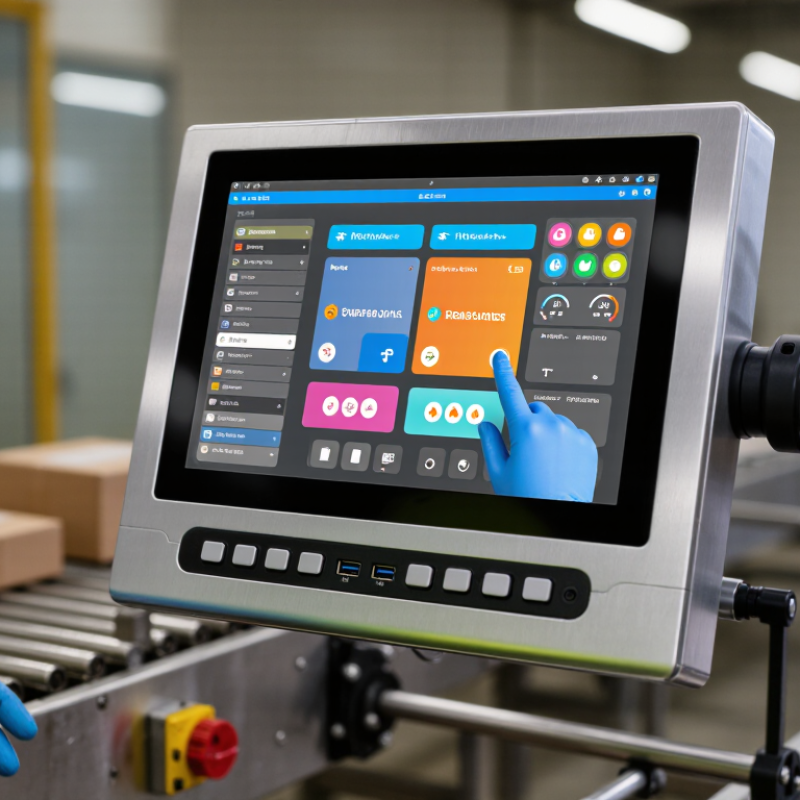
How to Choose an Industrial Panel Computer in 2026?
Define the Industrial Panel Computer’s Role and Operating Requirements
Start by defining the job the panel computer must perform. Will it display machine status, run a production interface, or collect data from several devices? A screen used only for monitoring has different processing and connection needs from one running control software. Write down required ports, network connections, storage, and operating system before comparing models.
Then examine the actual workspace. Note ambient temperatures, dust, moisture, vibration, and direct sunlight. A panel beside a washdown area may need a different enclosure rating from one mounted inside a clean control cabinet. Check the manufacturer’s stated operating range, not just the appearance of the housing. Consider screen brightness and touch response, too. Operators may wear gloves or view the display from an angle. Test the interface under those conditions if possible.
Plan for the full operating cycle. Record daily run hours, expected service life, mounting limits, and how technicians will reach the unit. A fanless design can reduce moving parts, but it may not suit every heat load. Small details matter. One assumption can derail a specification: teams often choose a display size early, then discover that the required software needs more memory or a different interface. Revisit the requirements with operators and maintenance staff before committing.
Choose screen size by the task, not by appearance. A 10-inch display may suit a compact machine where operators check status and tap a few large controls. For detailed charts or several on-screen panels, a 15-inch or larger screen can reduce scrolling. Check viewing distance, glove use, and available space on the cabinet door. A screen that looks generous on a desk may feel cramped once cables and nearby controls are installed.
Touch technology should match the environment. Resistive touch can work with gloves and styluses, while projected capacitive touch often supports clearer, responsive gestures. Neither is automatically better. Dust, moisture, cleaning routines, and accidental contact all matter. Ask how the panel behaves when water droplets or a gloved hand are present, then test representative tasks. Small buttons are easy to miss; enlarging them may improve accuracy, though it can crowd the layout.
Select a mounting format that fits both the enclosure and maintenance plan. Panel mounting offers a flush installation, while a VESA-style mount can help position a display on an arm. Check access to ports, ventilation, and fasteners before finalizing the layout. Leave room to remove the unit without dismantling nearby equipment. A slightly larger screen can feel wasteful, and a compact one can become frustrating. That trade-off deserves a real-site mock-up.
Choose an industrial panel computer around the work it must perform, not the largest specification sheet. A touchscreen HMI showing temperatures needs less processing power than a vision system inspecting fast-moving parts. For mixed workloads, leave CPU headroom for alarms, logging, and future software changes. Memory matters too. A practical test is to run the real interface, communications service, and data collection tasks together, then check peak memory use. Add room for growth; estimates are often too optimistic.
Storage and connectivity shape reliability on the plant floor. Solid-state storage handles vibration better than mechanical drives, while capacity should cover local logs during network outages.
IDC’s Worldwide Edge Spending Guide forecast nearly $232 billion in global edge spending for 2024, reflecting the growing role of local computing.
Gartner predicted that 75% of enterprise-generated data would be created and processed outside traditional data centers by 2025; this was a forecast, not a guarantee for every facility.
Check Ethernet port count, serial interfaces, Wi-Fi needs, and support for the protocols already used onsite. Small details matter. A port hidden behind a cabinet can become a maintenance headache. I would also verify operating temperature and connector access in the actual enclosure, since a tidy datasheet cannot show every installation compromise.
How to Choose an Industrial Panel Computer in 2026?
Check Environmental Ratings, Certifications, and Reliability
A panel computer may look suitable on a desk and fail beside a washdown line or a vibrating conveyor. Match its environmental rating to the actual installation, not a vague “industrial” label. An IP rating describes protection against solids and water under defined test conditions; it does not guarantee resistance to every chemical, cleaning method, or temperature. Read the fine print. Check whether the rating applies to the complete unit, including connectors and installed covers.
Certifications should fit the equipment’s destination and operating environment. Ask for current documentation, the exact model covered, and any installation conditions that affect compliance. A certificate is useful evidence, but it is not a substitute for checking the product’s construction and intended use. Also verify operating temperature, humidity limits, and vibration data. A computer mounted in a hot enclosure may face very different conditions from one in an air-conditioned control room.
Reliability is more than a long service-life claim. Look for thermal test results, storage-temperature limits, component availability, and a clear repair process. If possible, evaluate a sample under realistic conditions: run it through a full shift, connect the planned peripherals, and observe heat around the display and vents. Heat adds up. One detail is easy to overlook: a tightly sealed enclosure can trap heat, even when it blocks dust. The right choice may involve trade-offs, so document which risks matter most before comparing specifications.
Use this checklist to compare products for your application. Confirm ratings and certifications for the exact model, configuration, and installation method.
| Selection dimension | What to check | Practical guidance | Evidence to request |
|---|---|---|---|
| Ingress protection | IP code under IEC 60529, including which surfaces are protected | For a washdown-facing control-panel installation, verify the required protection for the front, rear, connectors, and enclosure as installed. An IP65 front panel does not mean the entire computer is IP65. | Test report or declaration identifying the tested model, seals, connectors, and mounting conditions |
| Enclosure rating | NEMA 250 type, if required by the project or local specification | Do not treat NEMA type numbers and IP codes as directly interchangeable. Confirm the rating covers the complete enclosure and the intended installation. | Manufacturer documentation or test evidence for the specified enclosure configuration |
| Operating temperature | Specified operating range for the complete computer, including display and touch function | Compare the rated range with measured ambient temperature inside the cabinet, not just the room temperature. Check any performance limits, such as reduced brightness or CPU speed at temperature extremes. | Datasheet conditions and test results for the exact panel size and configuration |
| Humidity and condensation | Humidity limits, condensation restrictions, and any conformal coating claims | A humidity rating does not necessarily mean the unit can operate with condensation. For damp or rapidly changing environments, review enclosure sealing and installation practices. | Environmental specification and stated test method or operating conditions |
| Shock and vibration | Applicable IEC 60068 test methods and the tested severity, mounting, and operating state | Select test levels based on the machine or vehicle environment. A reference to IEC 60068 alone does not establish that a product meets a particular vibration or shock level. | Test report specifying method, frequency or acceleration, duration, axes, and mounting arrangement |
| EMC immunity and emissions | Applicable EMC standards, such as IEC 61000-6-2 for industrial immunity and IEC 61000-6-4 for industrial emissions, where relevant | Check the requirements for the intended location and system. EMC performance can depend on cable type, grounding, installation, and connected peripherals. | Declaration and test documentation for the product configuration and applicable standards |
| Electrical safety | Applicable safety standard, which may include IEC 61010-1 or IEC 62368-1 depending on product design and intended use | Confirm the standard and certification route required by the destination market and application. A standard should not be assumed to apply to every industrial panel computer. | Safety certificate or declaration covering the exact model, power supply, and accessories used |
| Regulatory documentation | Market-specific EMC, radio, and safety requirements; applicable declarations and labels | A CE marking is generally supported by the manufacturer's declaration of conformity; it is not, by itself, proof of independent third-party testing. Check other national requirements where the equipment will be sold or installed. | Current declaration of conformity, applicable test reports, and product labeling details |
| Cooling and moving parts | Fanless or fan-cooled design, thermal limits, and required clearance | Fanless designs can reduce maintenance associated with fans, but still require adequate heat dissipation. Verify thermal performance at the intended ambient temperature and mounting orientation. | Thermal test data, installation clearances, and maintenance requirements |
| Reliability claims | MTBF figure, calculation or test method, assumptions, and covered components | MTBF is a statistical reliability estimate for a population under stated assumptions; it is not a guaranteed service life or a promise that an individual unit will operate for that duration. | Reliability report stating method, operating conditions, and exclusions |
| Long-term serviceability | Warranty terms, repair process, spare-part availability, and product-change notification | For equipment expected to remain in service for years, assess replacement options and operating-system or component lifecycle before purchase. | Written warranty, support policy, and lifecycle or change-management statement |
Compare Lifecycle Support, Total Cost, and Supplier Service
An industrial panel computer may remain on a production line for eight years or longer. Check how long the supplier expects to offer the exact processor, display, and interface configuration. A similar replacement is not always a drop-in replacement. Changes to mounting dimensions or connector positions can mean new brackets and extra downtime. Ask for written notice periods for product changes and end-of-life announcements. Get details, not just promises.
Compare total cost across the expected service period, not only the purchase price. Include installation, operating temperature requirements, spare units, software migration, and the cost of a technician’s visit. A cheaper unit can become expensive if its touchscreen fails and replacement stock takes weeks to arrive. Request warranty terms, repair turnaround estimates, and access to technical staff who understand your operating environment. Try a sample unit with gloves, bright lighting, and the actual control software. That matters. Supplier service can look excellent during a sales call, yet slow down after installation. I would still ask how support is measured; response-time figures alone may not show whether a fault gets resolved. Keep those answers beside the quote.
